
Tutorial
How to make golden, rainbow, shiny and huge pets in Roblox
Make golden, rainbow, shiny and huge Roblox pets: texture vs SurfaceAppearance tint vs script, rainbow Luau, Model:ScaleTo, particle cost and save data.
Updated 8 min readBy the Proppo team
On this page
Quick answer
Keep the same mesh and rig and change only the look. Bake gold or diamond into a separate texture, cycle a rainbow with a LocalScript that sets SurfaceAppearance.Color, add glow for shiny pets, and make huge pets with Model:ScaleTo around a bottom pivot. Store the variant as attributes on the model and as fields in the save data.
Key takeaways
- Gold, rainbow and shiny pets are the same mesh and rig with a different look, so a variant adds 0 triangles.
- Bake static looks (gold, diamond) into a texture; tint with SurfaceAppearance.Color; use a script only for motion like a rainbow cycle.
- Scripts can set SurfaceAppearance.Color, EmissiveStrength and EmissiveTint at runtime, but not its texture maps.
- Make huge pets with Model:ScaleTo, 2× to 4× as a rule of thumb, around a bottom-center pivot.
- Store the variant as attributes on the model and as plain fields in the save data: id, variant, huge.
Golden, rainbow, shiny and huge pets are how pet games turn one creature into a collection: the same pet in rarer, flashier looks. Done right, they cost almost nothing in modeling and very little in performance. This tutorial covers which variant is built how, the Roblox APIs involved (with working Luau), what effects cost on phones, and how to store a pet's variant. For the odds side of variants, see egg rarity tables.
What are golden, rainbow, shiny and huge pets?
They are rarer versions of a normal pet: golden and diamond change the material, rainbow adds color, shiny adds glow and sparkles, and huge scales the whole pet up. The mesh and rig stay the same in all of them.
Golden
- What changes
- Metallic gold material
- How to build it
- Baked gold texture (plus metalness map) on the same mesh
- Runtime cost
- None beyond a normal pet
Diamond / crystal
- What changes
- Icy, glossy material
- How to build it
- Baked texture, low roughness
- Runtime cost
- None beyond a normal pet
Rainbow
- What changes
- Multicolor, often animated
- How to build it
- Baked gradient texture, or a script that cycles the tint
- Runtime cost
- Static: none. Animated: a small client script
Shiny / neon
- What changes
- Glow and sparkle
- How to build it
- Emissive mask set in Studio, optional ParticleEmitter
- Runtime cost
- Particles add draw calls
Huge
- What changes
- Size, often 2× to 4×
- How to build it
- Model:ScaleTo on a clone of the normal pet
- Runtime cost
- More screen space; same triangles
Variant names vary by game. Size range for huge pets is a heuristic, not a Roblox rule.
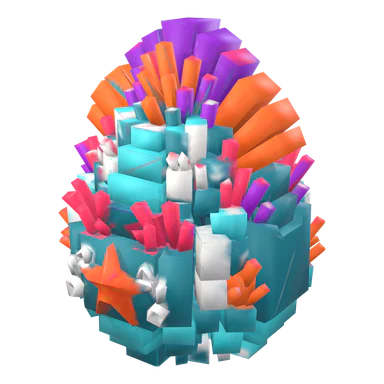
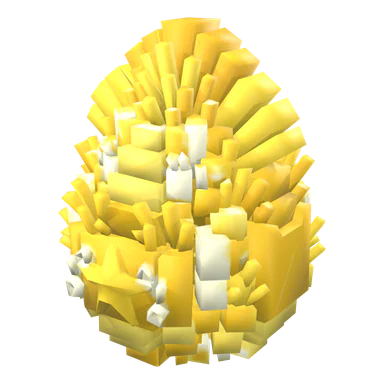
Should a variant be a texture, a SurfaceAppearance tint or a script?
Use a baked texture for looks that never move (gold, diamond), a SurfaceAppearance.Color tint for cheap color shifts, and a script only for animated effects. Scripts cannot swap a SurfaceAppearance's texture maps at runtime.
That last point shapes everything. On the SurfaceAppearance reference, the map properties (ColorMap, NormalMap, RoughnessMap, MetalnessMap, EmissiveMaskContent) carry Plugin Security, so only Studio and plugins can set them. Color, EmissiveStrength, EmissiveTint and AlphaMode have no such restriction. Roblox's own performance guide also suggests uploading one texture and using SurfaceAppearance.Color for color variations, because identical meshes with matching textures can be drawn together.
Separate texture per variant
- Good for
- Gold, diamond, shadow: any material change
- Set by scripts?
- No: prepare one Model per variant in Studio and clone it
- Notes
- Best quality; one extra texture per variant in memory
SurfaceAppearance.Color
- Good for
- Tints, team colors, cheap rainbow
- Set by scripts?
- Yes
- Notes
- Tints the existing color map, so it works best on a light texture
EmissiveStrength / EmissiveTint
- Good for
- Pulsing glow on shiny pets
- Set by scripts?
- Yes (the mask itself is set in Studio)
- Notes
- Needs an emissive mask on the SurfaceAppearance
ParticleEmitter, Highlight, lights
- Good for
- Sparkles, outlines, auras
- Set by scripts?
- Yes
- Notes
- The most expensive option on phones
In practice: build each material variant as its own Model in Studio (same MeshPart and rig, different SurfaceAppearance), keep the templates in ServerStorage, and clone the right one when a pet spawns. Glossary: SurfaceAppearance, variant.
How do you make a golden pet?
Recolor the pet's base texture to gold, make it read as metal (high metalness, low roughness) and put it on the same mesh. Do not rely on a flat yellow tint: without metal shading it looks like paint.
- Duplicate the pet's texture and shift it to warm gold, keeping the painted shading so details survive.
- Add a high-value metalness map and a fairly low roughness map, or bake both into the color if you only use a color map.
- In Studio, duplicate the pet Model, and on its SurfaceAppearance set the gold ColorMap, MetalnessMap and RoughnessMap.
- Name it
PetName_Goldnext toPetName_Normalso the spawn script below can find it.
Proppo (our own product) automates this: its variant step recolors the base texture into a full set (Gold, Diamond, Shadow, Rainbow and Neon) for 5 credits. The gold recipe uses metallic 0.9 and roughness 0.28, and every variant keeps the original mesh and rig, so the set shares one triangle budget and one set of animations.
How do you make a rainbow pet that cycles colors?
Give the rainbow variant a light, low-saturation texture, tag the pet, and let a LocalScript cycle SurfaceAppearance.Color through the hue wheel with Color3.fromHSV. Running it on the client keeps it smooth and off the server.
-- LocalScript in StarterPlayerScripts
-- Cycles the tint of every pet tagged "RainbowPet" through the color wheel.
local CollectionService = game:GetService("CollectionService")
local RunService = game:GetService("RunService")

local TAG = "RainbowPet"
local CYCLE_SECONDS = 4 -- one full trip around the color wheel
local UPDATE_INTERVAL = 1 / 20 -- 20 updates per second is smooth enough

local tracked: { [SurfaceAppearance]: boolean } = {}

local function add(pet: Instance)
	for _, d in pet:GetDescendants() do
		if d:IsA("SurfaceAppearance") then
			tracked[d] = true
		end
	end
end

local function remove(pet: Instance)
	for _, d in pet:GetDescendants() do
		if d:IsA("SurfaceAppearance") then
			tracked[d] = nil
		end
	end
end

for _, pet in CollectionService:GetTagged(TAG) do
	add(pet)
end
CollectionService:GetInstanceAddedSignal(TAG):Connect(add)
CollectionService:GetInstanceRemovedSignal(TAG):Connect(remove)

local elapsed = 0
RunService.Heartbeat:Connect(function(dt)
	elapsed += dt
	if elapsed < UPDATE_INTERVAL then
		return
	end
	elapsed = 0
	local hue = (os.clock() / CYCLE_SECONDS) % 1
	local color = Color3.fromHSV(hue, 0.6, 1)
	for appearance in tracked do
		if appearance.Parent then
			appearance.Color = color
		else
			tracked[appearance] = nil -- the pet was removed
		end
	end
end)- Why the client: the effect is purely visual, so every player can run it locally; nothing needs to replicate 20 times a second.
- Why tags: the spawn script adds the
RainbowPettag, and the client picks up every tagged pet, including other players' pets as they stream in. Set the pet Model'sModelStreamingModeto Atomic so its parts arrive together. - Static alternative: a baked rainbow-gradient texture costs nothing at runtime. Proppo's Rainbow variant is this kind of baked hue gradient.
How do you make a huge pet in Roblox?
Clone the normal pet and call Model:ScaleTo with a bigger factor. It scales the whole model around its pivot, so a pet with a bottom-center pivot stays on the ground.
Model:ScaleTo and Model:GetScale went live in 2023 (DevForum announcement). Per the Model reference, ScaleTo scales the model "around the pivot location" and scales the geometric properties of descendants, including part sizes, joints and particle emitter sizes. That means a huge pet keeps its sparkles in proportion, and its rig and animations keep working. The spawn script below handles variants and huge in one place:
-- Script in ServerScriptService
-- Templates live in ServerStorage.Pets, one Model per pet and variant: "MagmaDrake_Normal", "MagmaDrake_Gold", ...
local ServerStorage = game:GetService("ServerStorage")

local petsFolder = ServerStorage:WaitForChild("Pets")
local HUGE_SCALE = 3 -- heuristic: huge pets are usually 2x to 4x normal size

local function spawnPet(owner: Player, petId: string, variant: string, huge: boolean): Model
	local template = petsFolder:FindFirstChild(petId .. "_" .. variant)
	assert(template and template:IsA("Model"), "Missing pet template " .. petId .. "_" .. variant)

	local pet = template:Clone()
	if huge then
		-- scales around the pivot: with a bottom-center pivot the pet stays on the ground
		pet:ScaleTo(pet:GetScale() * HUGE_SCALE)
	end

	-- the variant flags travel with the model, so any script can read them
	pet:SetAttribute("PetId", petId)
	pet:SetAttribute("Variant", variant)
	pet:SetAttribute("Huge", huge)
	pet:SetAttribute("OwnerUserId", owner.UserId)
	if variant == "Rainbow" then
		pet:AddTag("RainbowPet") -- picked up by the client color-cycle script
	end

	pet.Parent = workspace
	return pet
end- Hover and follow offsets: if your follow script floats pets at a fixed height or distance, multiply those numbers by
pet:GetScale()so a huge pet doesn't sink into the player. - Texture: a 3× pet fills more of the screen, so its texture is stretched. If your huge pets look blurry, give them a 1024 px texture instead of 512 px.
- Triangles: unchanged. A huge pet costs the same geometry as the normal one.
How much do particles and glow cost on mobile?
More than the variant itself. Particles don't batch, partly transparent effects make the GPU draw the same pixels several times, and the first Highlight on screen can cost up to about 1 ms of GPU time on mobile.
Roblox's performance guide lists particles and overlapping transparency as common costs, and notes that changing ParticleEmitter properties can have a dramatic impact. The Highlight docs put the first highlight at up to about 1 ms on mobile and cap the client at 255 highlights. With dozens of pets in a server, a few rules of thumb (ours, not Roblox's) help:
- Give particles only to the top variants, with a low emission rate and small, short-lived particles.
- Prefer an emissive glow (EmissiveStrength) over particles: it is part of the material, not extra draw calls.
- Don't rewrite emitter properties every frame; toggle Enabled instead.
- Test with a full server of pets out, on a real mid-range phone.
How do you store which variant a pet is?
Keep the variant as data, not as a different pet: save the pet id plus a variant field and a huge flag, and set the same values as attributes on the spawned model so other scripts can read them.
-- What to save per owned pet (inside the player's DataStore record)
local ownedPet = {
	id = "MagmaDrake",
	variant = "Gold", -- "Normal", "Gold", "Rainbow", "Shiny" ...
	huge = false,
}
Attributes (SetAttribute / GetAttribute, see instance attributes) replicate from server to clients, so your UI can show a gold border and your client effects can react without extra remotes. Decide variants on the server when an egg hatches, never on the client. When you rebalance, a separate variant field lets you change the gold multiplier for every pet at once.
Next: the full sizes and Studio properties for pets are in Roblox pet model specs, and the bigger design picture is in how to design pets for a Roblox game.
Frequently asked questions
How do you make a golden pet in Roblox?
How do you make a rainbow pet in Roblox Studio?
How do you make a huge pet in Roblox?
Can a script change a SurfaceAppearance texture at runtime?
Do gold and rainbow pets hurt performance?
Give every pet a rarity set
Proppo recolors any pet into Gold, Diamond, Shadow, Rainbow and Neon on the same mesh and rig, ready to import into Roblox Studio.
60 free credits when you confirm your email. No card needed.
Related guides
All guides Game design
Game design
Pet simulator egg rarity tables: how to design them
Tiers, drop-rate math, gold and rainbow variants, pity timers and the odds rules Roblox asks for.
6 min readUpdated October 31, 2026Read
 Game design
Game design
How to design pets for a Roblox game
Readability, themes, rarity escalation, a style lock, budgets and the concept-to-Studio checklist.
8 min readUpdated October 31, 2026Read
 Tutorial
Tutorial
How to animate a pet in Roblox (idle, walk, fly)
Bones and weights, looping clips, the import and publish steps, and a script that switches idle to walk.
7 min readUpdated October 31, 2026Read
 Reference
Reference
Roblox triangle and texture limits for mobile-friendly pets
The hard limits, the budgets pet games actually use, and how to hit them without losing the silhouette.
5 min readUpdated October 31, 2026Read